The Provisioner Node
Provisioner nodes are non-execution nodes that provide data to the graph to be used by other nodes/processors.
Example: Suppose you want to check if a certain condition is met before executing a particular branch. Provisioner nodes allow you to provide the value of the condition at runtime. It could be a friendship value, the status of a quest or the time of day. Provisioner nodes allow the conditions to be decoupled from the branch logic.
Creating a Provisioner Node
Now we will create a provisioner node that will connect to an action which will print a given value to the console. The provisioner node will be used to provide the text to print.
Create The Action
[Serializable, Node("Examples", "", "Console Writer")]
[UseWithContext(typeof(ActionNode))]
public class ConsoleWriterAction : DialogueBlockNode<WriterData>
{
    public const string IN_TEXT = "textToWrite";

    protected override void OnDefinePorts(IPortDefinitionContext context)
    {
        base.OnDefinePorts(context);
        context.AddInputPort<string>(IN_TEXT).WithDisplayName("Text").Build();
    }

    public override WriterData ProcessNodeAsset(DialogueGraph graph, Dictionary<IPort, int> portMap)
    {
        WriterData data = new();
        data.text = GetPortValue<string>(GetInputPortByName(IN_TEXT));

        return data;
    }
}
[Serializable]
public class WriterData : DialogueNodeData
{
    public string text;
}

public class ConsoleWriterProcessor : DialogueProcessor<WriterData>
{
    protected override void ProcessNode(WriterData nodeData, DialogueDirector director)
    {
        Debug.Log(nodeData.text);
    }
}
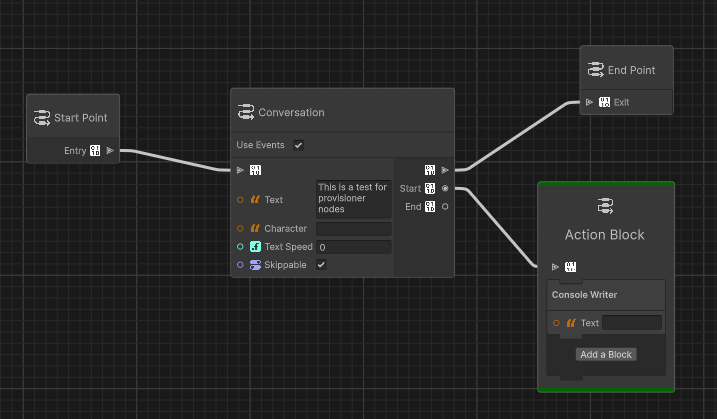
Intead of manually writing the text in the Consoler Writer port, we will link a provisioner node which will dispatch the text.
Creating The Provisioner Node
[Serializable, Node("Examples", "", "Text Provisioner")]
[UseWithGraph(typeof(DialogueEditorGraph))]
public class TextProvisioner : ProvisionerNode<string>
{
    protected override string CreateProvisionedData() => throw new NotImplementedException();
}
First we need to implement string CreateProvisionedData(). This will create the provisioned data (in our case a text) to dispatch to
other nodes.
Note
ProvisionerNode<T> automatically caches values after it has been created. If you do not wish to use this behaviour, you may override
T1 GetProvisionedData<T1>()
We will hardcode the provisioner node to output Hello Word!
[Serializable, Node("Examples", "", "Text Provisioner")]
[UseWithGraph(typeof(DialogueEditorGraph))]
public class TextProvisioner : ProvisionerNode<string>
{
    protected override string CreateProvisionedData() => "Hello World!";
}
Provisioner nodes cannot use processors, as they provide data to other nodes and do not run any behaviour.
Using The Provisioner Node
Tip
We will also discuss how to implement provisioner nodes that evaluate their data at runtime
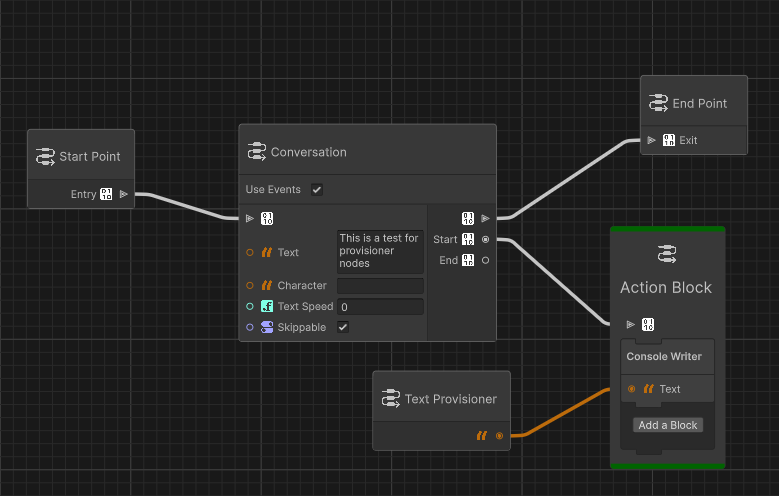
Now play the graph and observe Hello World! being printed to the console.
Warning
Ensure that the dialogue director is able to discover the ConsoleWriterProcesoor
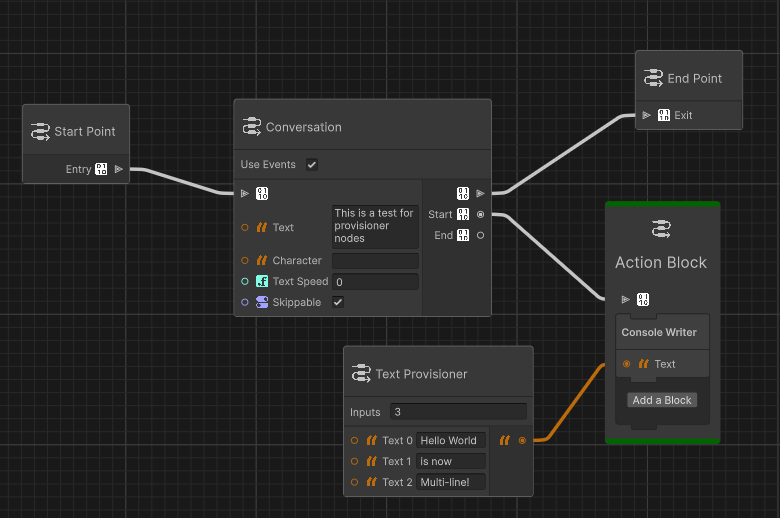
In its current state, the provisioner nodes acts in the same manner as a constant node. However, you made add input ports and manipulate multiple inputs to provide a singular output. A provisioner node could be a string builder that takes in multiple strings (possibly from other provisioners) and combine them before sending them out.
[Serializable, Node("Examples", "", "Text Provisioner")]
[UseWithGraph(typeof(DialogueEditorGraph))]
public class TextProvisioner : ProvisionerNode<string>
{
    public const string OP_IN_TEXT_INPUTS = "InputCount";

    public const string IN_TEXT_INPUT = "TextInput";

    protected override void OnDefineOptions(IOptionDefinitionContext context)
    {
        base.OnDefineOptions(context);
        context.AddOption<int>(OP_IN_TEXT_INPUTS).WithDefaultValue(2).WithDisplayName("Inputs").Build();
    }

    protected override void OnDefinePorts(IPortDefinitionContext context)
    {
        base.OnDefinePorts(context);
        GetNodeOptionByName(OP_IN_TEXT_INPUTS).TryGetValue(out int inputCount);

        for (int i = 0; i < inputCount; i++)
        {
            context.AddInputPort<string>(OP_IN_TEXT_INPUTS + i).WithDisplayName("Text " + i).Build();
        }
    }

    protected override string CreateProvisionedData()
    {
        StringBuilder sb = new();

        GetNodeOptionByName(OP_IN_TEXT_INPUTS).TryGetValue(out int inputCount);

        for (int i = 0; i < inputCount; i++)
        {
            string text = IDialogueGraphNode.GetPortValue<string>(GetInputPortByName(OP_IN_TEXT_INPUTS + i));
            sb.AppendLine(text);
        }

        return sb.ToString();
    }
}
Tip
Provisioning can also be done through scriptableobjects for immutable data. Implement the IScriptableObjectProvisionerNode interface
for SO provisioning. This allows for data to be updated at runtime.
Runtime Provisioning
If you need access to scene references or do not wish to use SOAP, the dialogue system allows provisioner nodes to act as preprocessors on nodes which require provisioning. As such, runtime provisioners need a processor counterpart at runtime.
Creating The Provisioner Data
Runtime provisioners require 2 data types. First, the data that will be passed to the runtime processor (this is the same as with normal dialogue processors). Then, the data type that this node will provide (same as the provisioner mentioned above).
Only the data passed to the runtime provisioner needs to be unique for each runtime provisioner type.
In this example we will create a provisioner node that we will link to a conversation node's text port.
[Serializable]
public class MyExampleProvisionerData : ProvisionerData
{
    public string name;
}
Creating The Provisioner Node
This step is the same as with normal provisioner nodes, except that T CreateProvisionedData() cannot be implemented
and instead public abstract void ProcessNodeCore(ref TOut provisionData, DialogueGraph graph, Dictionary<IPort, int> portMap);
needs to be implemented. This is again similar to how dialogue processors work
However, unlike dialogue processors, the data is already created and passed to you for further processing. This is needed to embed metadata to identify the ports to provision.
[Serializable]
[UseWithGraph(typeof(DialogueEditorGraph))]
public class RProvisionerNode : RuntimeProvisionerNode<string, MyExampleProvisionerData>
{
    public const string IN_NAME = "name";

    protected override void OnDefinePorts(IPortDefinitionContext context)
    {
        base.OnDefinePorts(context);
        context.AddInputPort<string>(IN_NAME).Build();
    }

    public override void ProcessNodeCore(ref MyExampleProvisionerData provisionData, DialogueGraph graph, Dictionary<IPort, int> portMap)
    {
        provisionData.name = IDialogueGraphNode.GetPortValue<string>(GetInputPortByName(IN_NAME));
    }
}
Now add the node to a graph and link it to a conversation node.
Creating The Runtime Provisioner
public class RuntimeProvisioner : DialogueProvisioner<MyExampleProvisionerData, string>
{
    public override bool SupportsCaching => false;
    protected override string CreateProvisionedData(MyExampleProvisionerData data)
    {
        return data.name + " " + Random.Range(0, 101);
    }
}
Runtime provisioners, like normal provisioners will cache their data per instance of the processor. This is useful for data that never changes
such as the player name. However for changing data that depends on the input MyExampleProvisionerData, caching should be disabled. This is
done by overriding public override bool SupportsCaching => false
Finally implement abstract TOut CreateProvisionedData(TIn nodeData);
Supporting Runtime Provisioners
Unlike normal provisioners, runtime provisioners require an attribute on the field that needs to be provisioned in the relevant node's data.
For example, in the ConversationNode, if we want the text field to be provisioned. It needs to be decorated with the
Provision attribute. This attribute requires the name of the port that would normally put the data there.
[Serializable]
public class ConversationNodeData : DialogueNodeData
{
    public const string IN_TEXT = "Text";

    [Provision(IN_TEXT)]
    public string text;
    public string characterName;
    public float textSpeed;
    public bool skippable;
}
Any runtime provisioner node that outputs string can set to provision text in this manner.
Note
When a port is connected to a provisioner node, the port will contain the default value of the requested data during the import phase. The true value will then be added at runtime